

Founder notes
Automated Dispatch and Technician Routing: What Still Needs a Human?
By Djordje (George) Milićević · Thinking Mans Systems
Published
Quick take
Automate clear, low-risk dispatch suggestions and status changes, but keep people responsible for job readiness, customer commitments, technician fit, conflicts, and safety-sensitive exceptions. A route estimate is an input to a decision, not permission to move a job. Give uncertain data and failed updates a named owner before they affect the schedule.
Dispatch is not just choosing the shortest drive. It is deciding who can do the work, whether the job is ready, and which promises survive when the day changes. A system can assemble those facts and propose a next step. It should not treat a blank calendar or a nearby GPS dot as approval to send a technician.
This note concerns assignment and routing after a job has entered the schedule. For the separate question of customer confirmation, see our guide to reducing appointment no-shows. A confirmed visit can still be the wrong assignment if skills, parts, or travel constraints changed.
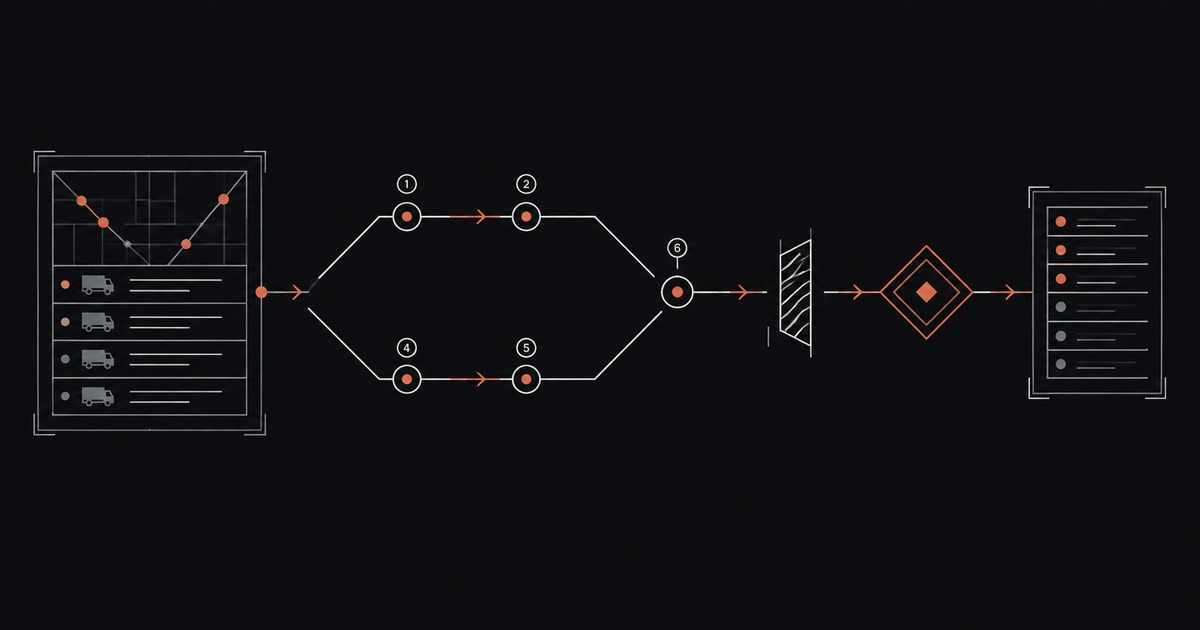
What can a simple dispatch rule safely handle?
Start with a suggestion, not a reassignment. A rule can flag a new ready job, filter technicians by recorded qualifications, compare travel estimates, and show candidates to dispatch. It can also copy a verified completion status into the dispatch board or raise a late-arrival alert. Each action needs an explicit trigger, current inputs, and a defined outcome when a required fact is missing.
Keep proposed, approved, saved, and communicated as separate states. A suggestion should show the job version and facts used to produce it. Before accepting it, dispatch rechecks the live record. If another dispatcher already changed the assignment, discard the old suggestion rather than applying it over the newer decision.
The boundary is consequence. Sorting eligible candidates is different from promising an arrival time or pulling a technician off unfinished work. Automate a low-risk status transition only when its evidence and reversal rules are clear. Leave ambiguous readiness, customer commitments, conflicts, and safety-sensitive work with a person authorized to decide.
What would the dispatch record look like in a small plumbing business?
Illustrative demo only: Consider a fictional US plumbing business with eight technicians and scheduled repair windows. One technician is finishing a repair when a new leak call arrives. The board suggests a nearby technician, but the new job needs equipment that technician does not carry. This example describes a decision boundary, not a client system or a claim about results.
In this demo, job P-204 has a current status of ready for dispatch, an assigned technician or an explicit unassigned value, and a 1:00 to 3:00 p.m. arrival window with its time zone. Its record also holds the verified service address, required skills, equipment and access constraints, expected service duration, and the latest decision with reviewer, timestamp, reason, and record version. Keep arrival windows separate from estimated work duration. Neither is an exact completion promise.
Readiness means the information required for this job type was checked. Record whether the customer can provide access, whether required parts are available, and whether the assigned technician accepted the work. A job note saying “probably in stock” is an unresolved condition, not a parts check. Dispatch owns readiness, while a service manager resolves technical or safety uncertainty.
Store when each input was last verified. A route proposal based on yesterday’s technician location or an earlier address should expire. The latest decision must remain readable even if a subsequent estimate changes, so the team can distinguish an approved assignment from a fresh suggestion.
Is calculating a route the same as optimizing the whole team?
No. Google’s Routes API quick reference (opens in a new tab) distinguishes Compute Routes, which returns a route between locations with optional intermediate stops, from Compute Route Matrix, which compares travel distance and time across origin and destination combinations. Those calculations help dispatch compare candidates. They do not themselves establish which technician should own a job.
Google’s Route Optimization API overview (opens in a new tab) describes assigning tasks and routes to a vehicle fleet against supplied objectives and constraints. That is a different problem: assignments compete with one another across the schedule. Even an optimized plan depends on the constraints you actually supply. Missing a required skill or a customer promise does not make that requirement disappear in real life.
A small team can start with route estimates for eligible technicians and human approval. Consider fleet optimization when several competing assignments need to be evaluated together. First make the constraints dependable and decide which jobs are fixed. A mathematically attractive plan can be unacceptable if it moves a visit the customer was explicitly told would stay in place.
Which constraints matter before anyone promises an arrival?
Filter for technician fit before ranking by distance. Relevant checks can include job-specific qualifications, equipment, supervision requirements, shift boundaries, and whether the previous job can actually finish. A dispatcher should not override a technical restriction just because the nearest candidate appears free.
Google’s Compute Routes overview (opens in a new tab) describes driving routes with traffic information. Use an estimate as an estimate. It cannot establish when a repair will end, whether a loading space is available, or how long building access will take. Include separate allowances for uncertain service duration, parking, loading, and access instead of silently treating travel time as the entire gap between visits.
In the fictional plumbing demo, dispatch might reserve an additional 20-minute access and travel buffer for a particular building. That is an illustrative policy, not a recommended universal interval. Use the team’s actual constraints, and have dispatch review a proposed arrival that only works if every preceding task ends at its optimistic estimate.
Google Calendar’s free/busy query reference (opens in a new tab) returns busy intervals for requested calendars and can include errors for individual calendars. Inspect those errors. A failed calendar read is unknown availability, not an empty schedule. Free time also does not prove the technician has the required parts or can reach the address within the promised window.
GPS adds another uncertainty. Keep a location timestamp and use only information collected under the business’s approved policy. A delayed location update, a weak signal, or a phone left in a vehicle can misrepresent availability. If the location is stale, ask the technician for their current work status before changing a commitment.
Who decides when the day stops following the plan?
A late finish, an urgent call, an unavailable part, or a locked building should create a decision case. Show the affected jobs and promises together. Avoid a chain reaction in which every new estimate automatically shifts later visits without anyone reviewing which customers need contact.
| Situation | Automation action | Cannot decide alone | Human owner |
|---|---|---|---|
| New job | Check required fields and suggest eligible technicians | Job readiness and customer promise | Dispatcher |
| Technician late | Flag affected windows and refresh travel estimates | Whether to interrupt work or renegotiate arrivals | Dispatcher |
| Urgent same-day job | Show eligible candidates and displaced visits | Safety priority and acceptable disruption | Service manager |
| Parts or access issue | Hold the proposal and record the missing prerequisite | Whether work can safely proceed | Service manager |
| Calendar conflict | Reject the stale suggestion and show conflicting records | Which commitment can change | Dispatcher |
| Failed route or write | Mark outcome unknown and reconcile saved state | Whether an assignment exists or a retry is safe | Workflow owner with dispatcher |
These are roles, not actual staff assignments. Put a real person and backup against each role before launch. The dispatcher owns customer contact and scheduling consequences. The service manager decides technical suitability and safety-sensitive exceptions. The workflow owner investigates integration failures, but cannot make a customer promise simply to close an error ticket.
A customer reply such as “after lunch is fine if you bring the replacement” carries both a timing preference and a condition. Keep the original reply visible and ask dispatch to resolve it. Do not convert a phrase like “fine” into unconditional approval, or let an automated classification erase the missing part.
What happens if a route request or dispatch write fails?
A failed route calculation should stop the proposal that depends on it. Do not replace an unavailable estimate with zero minutes. Preserve the input addresses, timestamp, request reference, and failure category so dispatch can make a manual decision with the uncertainty visible.
A timeout during a write is harder. The assignment might have been saved even though the response did not arrive. Use a durable operation reference tied to the job and approved assignment version, prevent concurrent workers from applying the same operation, and read back the target record before deciding to retry. A second webhook should find the existing processing record rather than create another dispatch.
Google’s event creation guide (opens in a new tab) explains that supplying an event ID in the required format can prevent duplicate event creation when an operation fails after succeeding in the Calendar backend. That protection is specific to the supported event operation. Do not assume your dispatch connector offers the same guarantee or that an event ID protects every update across multiple tools.
Reconcile the job assignment, calendar event, and technician notification separately. If the calendar write succeeded but the dispatch board did not, mark the partial outcome and keep it under review. Our note on uncertain writes and duplicate protection in CRM-to-QuickBooks sync covers the same failure boundary for invoices. Here, the risk is two conflicting assignments or a customer being notified about a change that never saved.
For a confirmed temporary failure, use bounded retries with increasing delays and respect the provider’s documented guidance. Stop at the agreed attempt or time limit. Missing data, denied access, and conflicting versions need correction, not repeated requests. An uncertain write needs reconciliation before another attempt. After recovery, reread the live job rather than replaying an expired proposal.
How do you know the technician or customer received the change?
Save the approved assignment first, then send the appropriate notification and track its outcome separately. Twilio’s outbound message status guide (opens in a new tab) describes status callbacks for changes such as sent, delivered, failed, and undelivered. Delivery status does not establish that a technician accepted the job or that a customer agreed to a revised arrival window.
Keep message reference, assignment version, latest delivery status, and any reply together. If the assignment changes while a message is queued, stop the outdated message. An ambiguous reply needs review, and a failed send needs a contact decision. For an urgent operational change, the dispatcher may need to call under the team’s agreed policy instead of waiting for another automatic text attempt.
A failed message must not roll the job back automatically or trigger a new assignment. Record that the saved decision exists but communication is unresolved. That gives dispatch a precise task: verify acceptance or agree the next step with the customer, without guessing whether the schedule changed.
How does the exception queue catch failures nobody noticed?
Give each exception a job ID, reason, affected window, last verified state, owner, next review time, and permitted next action. Separate customer decisions from technical recovery, but keep both linked to the same job. Do not close the case merely because an alert was sent. Close it when the approved assignment is read back and the required communication is resolved or deliberately left pending.
n8n’s error workflow guidance (opens in a new tab) explains how execution failures can trigger an error workflow and how Stop And Error can deliberately fail an execution. Configure required checks to fail visibly. A workflow that completes while skipping a needed write can otherwise look healthy.
Also reconcile ready and approved jobs against saved assignments on a defined schedule. Check for stuck pending states and missing runs. An error workflow cannot be your only safeguard for a trigger that never arrived. If the primary dispatcher is unavailable, the named backup should receive unresolved decisions before their arrival windows become impossible.
Start with one job type in suggestion-only mode. Test a stale GPS position, a late repair, a missing part, two dispatchers approving different candidates, a calendar read error, a timeout after a successful write, a repeated event, and an undelivered notification. Confirm that each uncertainty stops at the right owner instead of becoming an automatic promise. Our scheduling and dispatch automation work starts with those boundaries between tools and the people responsible for the day.
Common questions
- Should the nearest technician automatically get the urgent job?
- No. Check required skills, equipment, current work, travel time, and commitments already made. The dispatcher can compare eligible candidates, but the service manager should decide when urgency or safety requires changing priorities.
- Do we need whole-fleet route optimization for a small team?
- Not necessarily. Start with reliable job records, explicit constraints, and route estimates for eligible technicians. Consider fleet optimization when competing assignments need to be evaluated together, and only after the dispatcher can validate the constraints and review proposed changes.
- Should a failed dispatch update be retried automatically?
- Retry a confirmed temporary failure only under a bounded policy. If the response was lost, read back the assignment and calendar before another write. Keep the job on hold when the outcome is uncertain, and have the workflow owner reconcile it with the dispatcher.
Want to review one dispatch decision?
Bring a redacted job record, the schedule it affects, and one exception your dispatcher handles today. We can work through what a rule can safely suggest and where a person should stay in control before deciding whether anything needs to be built.
Let’s work through it