

Founder notes
How to Automate Google Review Requests Without Review Gating
By Djordje (George) Milićević · Thinking Mans Systems
Published
Quick take
Send one neutral Google review request after a defined completed-service event, log the attempt, and route complaints to a named owner. Apply the same invitation rule regardless of predicted satisfaction or requested ratings, with at most one follow-up under a documented policy. A customer-service survey must never decide who gets the review link.
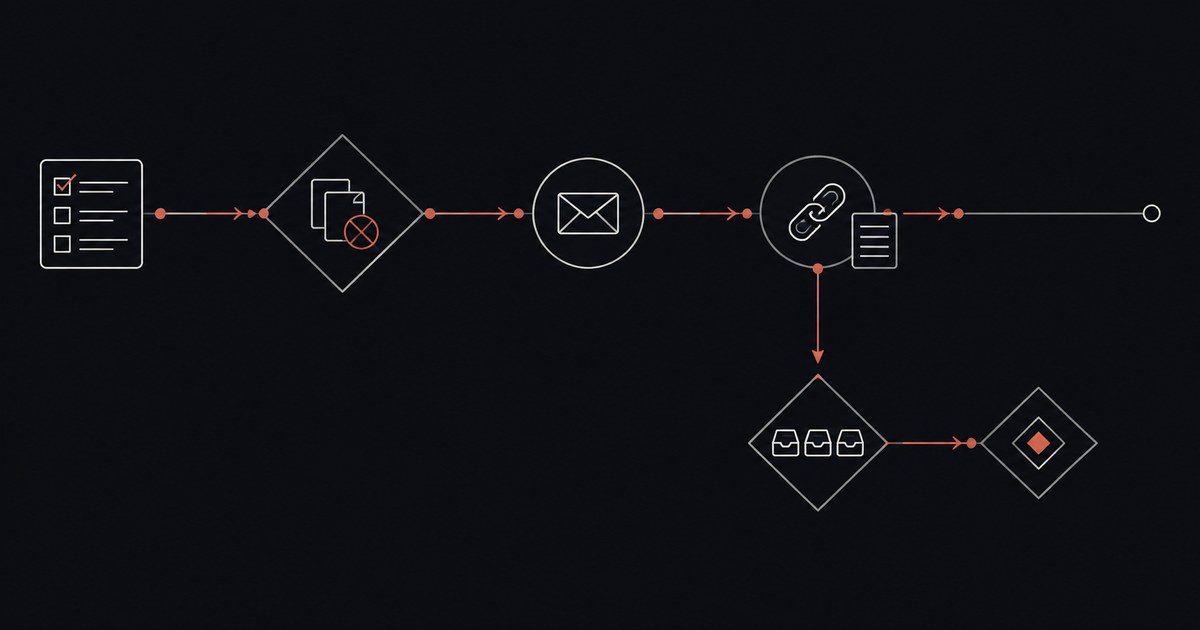
A review request belongs after a real service experience, not after a software guess that someone will give you five stars. The useful automation is a small handoff: establish that the work happened, send a neutral invitation, record what happened to the message, and make sure a person sees any reply that needs help.
This is different from booking reminders or dispatch decisions. Those workflows establish whether a visit can happen. A review workflow starts after a defined completion event and must not turn customer satisfaction into permission to speak publicly.
What counts as review gating, and what can you automate instead?
Review gating means using a screening step to steer satisfied customers toward a public review while directing dissatisfied customers somewhere else. A form that reveals the Google link only after a high score is one example. Asking a worker to select “happy customers” for an invitation creates the same problem without a form.
Google’s Maps policy on fake engagement and rating manipulation (opens in a new tab) requires genuine experiences and prohibits incentives, discouraging negative reviews, and selectively soliciting positive reviews. It also says merchants should not pressure users to leave ratings or reviews while on the premises or request specific review content. Do not offer a discount, script the praise, ask for a particular rating, or reward removal of a negative review.
Instead, define an objective event such as a verified completed cleaning visit. Apply the same request rule to every customer who meets that event and the same contact rules. Do not add sentiment scores, complaint labels, payment size, or a staff prediction of the likely rating to the eligibility check.
A private recovery survey can still help the service team. Its answers belong in a support queue, not in the review invitation decision. Customers who report a problem should retain the same opportunity to leave an honest review. This is workflow guidance, not legal advice. Have the responsible person check applicable messaging obligations before launch.
How would this work in a six-person cleaning business?
Illustrative demo only: Consider a fictional US residential cleaning business with six people. Its operations lead, Morgan, owns the review-request workflow and customer replies. Riley is the backup when Morgan is unavailable. These names and steps describe a demo, not a client or measured result.
The demo’s trigger is a completed visit that a responsible staff member has verified. Job C-318 records its customer ID, actual service date, completion version, approved contact channel, and the applicable contact permission. A canceled booking or an appointment ending on the calendar is not enough. Do not mistake the scheduled end time for proof the cleaning took place.
The request reads: “Thank you for choosing us for your cleaning visit. If you’d like to share your experience, you can leave an honest Google review here: [review link]. If you need help with the visit, reply to this message and Morgan will follow up.” The bracketed link is a placeholder in this demo, not a live business link. Neither option depends on selecting a rating first.
Use the business’s verified review link and test that it opens the intended Business Profile. Give the review link and help option together. Do not label one path “happy” and the other “unhappy,” or make resolving a complaint conditional on changing a review.
For this demo, the team chooses one invitation after verified completion and at most one follow-up three days later if there is no reply or opt-out. That timing is an illustrative decision, not a benchmark or a Google requirement. A reply ends automatic follow-up and gives Morgan the conversation. Silence after the follow-up closes the sequence without another prompt.
Which rules should prevent an unwanted or duplicate request?
Keep the completed-service rule separate from contact suppression. No real visit, an invalid address, an opt-out, a duplicate event, or an already exhausted request sequence can stop a send. A negative survey answer cannot. Give every skipped request a readable reason so the owner can distinguish respectful contact limits from hidden positive-only selection.
For recurring visits, choose one repeat-contact interval for all customers before launch. Store the previous invitation and apply that interval consistently. Do not ask after every recurring visit by default, and do not shorten the interval because a worker thinks the customer will praise the team. A customer saying they already reviewed should stop the follow-up without requiring a screenshot.
Twilio’s Advanced Opt-Out documentation (opens in a new tab) describes opt-out keywords, confirmation messages, and the OptOutType value available to the receiving workflow when the feature is enabled. Connect those events to your suppression record. A corrected phone number or a new job must not silently erase an opt-out, and a complaint must not be misclassified as a request to opt back in.
Create a durable request record for the job, customer, and sequence before handing the message to the provider. Use an operation key for the initial request and a separate key for its single follow-up. Two workers receiving the same completion event must claim the same operation rather than each send a message. Reopening and completing the job again should not create a fresh sequence automatically.
Store eligibility version, suppression reason, message template version, intended review link, send attempt, provider reference, latest verified message state, replies, follow-up count, and owner. Record enough to understand the handoff without copying unnecessary customer notes into a messaging log.
Who owns each event when the request leaves the normal path?
The workflow should create a precise task, not just an alert. Morgan owns customer contact and completion corrections. A designated workflow maintainer owns uncertain technical writes. If one person fills both roles, preserve the distinction between fixing the integration and deciding what to say to the customer.
| Event | Automation action | What must not happen | Human owner |
|---|---|---|---|
| Completed job | Verify actual service and contact eligibility, then send one neutral request | Choose recipients by predicted rating | Operations lead |
| No response | Allow at most one eligible follow-up, then close the sequence | Keep sending or treat silence as praise | Operations lead |
| Customer complaint | Stop the automatic follow-up on any reply and open a support case | Withhold the review link or demand review changes | Customer-service owner |
| Duplicate trigger | Find the existing operation and record the repeat event | Start another invitation sequence | Workflow maintainer |
| Delivery failure | Record the failure and review whether any further contact is appropriate | Switch channels to bypass an opt-out | Operations lead with workflow maintainer |
| Completion marked in error | Stop pending sends and reconcile the corrected job | Pretend the request never went out or ask for a review of unperformed work | Operations lead |
Put a named owner, backup, next review time, and permitted action on every open case. A failed notification to the owner should remain visible. Do not mark the customer’s problem resolved merely because the workflow posted an internal alert.
If a request was sent before a completion mistake was discovered, preserve the log and have Morgan correct the misunderstanding directly. Do not resend automatically when the job is eventually completed. Review the existing sequence and current contact state first. Our note on human review in automated dispatch explains why a changed job record needs an accountable decision rather than another blind status transition.
What does message status tell you, and what does it not prove?
Twilio’s outbound message status guide (opens in a new tab) describes status callbacks across the message lifecycle, including delivery failures and error information. Store the provider message reference and distinguish accepted, sent, delivered, failed, and unresolved outcomes. A delivered text is not proof that the customer read it, agreed with it, or posted a review.
Design callback handling so a delayed earlier status cannot overwrite a later verified delivery state. Preserve received events and reconcile inconsistent updates with the provider record instead of using whichever callback arrived last as truth. This is a recommended application safeguard, not a claim that every provider callback follows a particular order.
Do not trigger another invitation because a delivery callback is missing. The first message may still have been accepted. Separate delivery failure from no response and from unknown acceptance. Each condition needs a different next decision. A failed message should go to Morgan for a contact decision, not automatically become a phone call, email, and second text.
Keep responses attached to the same request record. “Thanks” is a reply, not proof of a review. “The bathroom was missed” is a support task. “Stop” is a contact stop. An unclear reply goes to the owner, with automatic follow-up paused on all replies rather than only on unfavorable ones. See how appointment reminders separate replies from delivery status for the same distinction before a visit.
How should a complaint affect the review workflow?
A complaint arriving after the invitation opens a separate service case with the job ID, original reply, owner, and next action. Stop the automatic follow-up because the customer has replied, as you would for any other reply. Keep the neutral review invitation available. Do not suppress future eligibility solely because the customer reported a problem.
The owner can acknowledge the issue, verify the work, and arrange the appropriate service response. None of those steps should require the customer to remove, revise, or postpone a public review. Do not turn a refund or a return visit into compensation for a review change.
Google’s Business Profile restrictions for policy violations (opens in a new tab) says fake-engagement violations can lead to profile restrictions in addition to removal of violating reviews. Treat the invitation rule as a policy boundary worth checking, not a growth tactic to bend when a complaint arrives.
Google’s Business Profile API reference (opens in a new tab) lists review-management operations including listing reviews and managing business replies. Those operations are not permission to generate a customer review or select who gets asked. If the team monitors public reviews through an authorized integration, keep that work separate from the invitation sequence. An unmatched display name is not a dependable customer identity.
What should happen after a timeout or a missing workflow run?
A timeout during message creation leaves an uncertain outcome. The provider may have accepted the request even though your workflow did not receive its reference. Mark the operation unknown, check the saved send record and provider evidence, and do not immediately create another message. A local duplicate key protects your own workers, but does not guarantee that a provider supports duplicate-safe retries.
For a confirmed temporary failure before acceptance, use bounded retries with increasing delays under the provider’s documented rules. Once the outcome is uncertain, reconcile before retrying. Missing contact data, an opt-out, or corrected completion status needs a decision, not repeated requests. If acceptance cannot be established, leave the sequence stopped and give the maintainer the case.
n8n’s error workflow guidance (opens in a new tab) explains how an Error Trigger can start an error workflow and how Stop And Error can deliberately fail an execution. Make required eligibility and write checks fail visibly. An execution that ends successfully after skipping a required step should not count as a completed request.
Also compare eligible completed jobs with request records on a defined schedule. An error workflow cannot report an event that never reached it. Give missing operations and stuck unknown states an owner. Morgan’s manual fallback is to inspect the job and contact history, handle any support case, and decide whether one neutral request remains appropriate. Manual work must use the same eligibility and contact limits as automation.
What should you test before the first customer receives a request?
Test a genuine completed job, a canceled visit, a duplicate completion event, an opt-out, a positive survey, a negative survey, no survey response, and a complaint after sending. The survey cases should produce the same invitation eligibility. The complaint should create a support case without removing the existing review opportunity.
Then test delayed message statuses, a timeout after acceptance, a corrected completion record, a reply just before the follow-up, and an owner who is unavailable. Confirm that no scenario creates a second initial request, a second follow-up, or an unowned exception. Review the message itself for accidental rating pressure and verify the destination link on a phone.
Review skipped-request reasons after launch. If staff keep excluding “difficult” customers, the implementation has drifted into selective solicitation even if the original diagram looked neutral. Our client intake automation work addresses the earlier record and ownership checks that make these later handoffs traceable. The review step should reuse verified contact facts, not guess them from a name.
Common questions
- Can we ask for private feedback before sending the Google review link?
- Yes, but private feedback must not determine access to the review invitation. Apply the same completed-service rule regardless of the survey answer or whether a customer responds. Route complaints to customer service separately, without withholding the link from dissatisfied customers.
- Should every recurring cleaning visit trigger another review request?
- No. Choose a documented repeat-contact interval and apply it equally across customers. In this demo, one eligible job starts one request sequence with at most one follow-up. Later job events do not restart that sequence, and opt-outs stop further messages.
- What should we do if the review request times out while sending?
- Treat the outcome as unknown, not as a failed delivery. Check the saved operation and provider message reference before sending again. If acceptance cannot be established, stop the automatic sequence and give the workflow owner the case rather than risk a duplicate.
Want to check one review-request handoff?
Bring a redacted completion record, your current request message, and one exception the team handles manually. We can check the eligibility rule, contact limits, and ownership together before deciding whether anything needs to be built.
Let’s work through it